The Problem With Volume-Based Outbound
Outbound prospecting has become expensive, noisy, and hard to trust.
Many companies pay thousands of dollars every month to outbound agencies. These agencies often charge based on the number of emails they send, the number of inboxes they manage, and the sending infrastructure they set up.
That means the system is still built around volume.
More emails require more domains. More domains require more inboxes. More inboxes require warming and infrastructure support. And all of that creates more work just to avoid being marked as spam.
I would call it a cycle of volume, avoidance, and diminishing returns.
But is that the problem you really want to solve?
Probably not.
Your real goal is not to send more emails. Your goal is to get the right prospects to notice you, trust you, and engage with you.
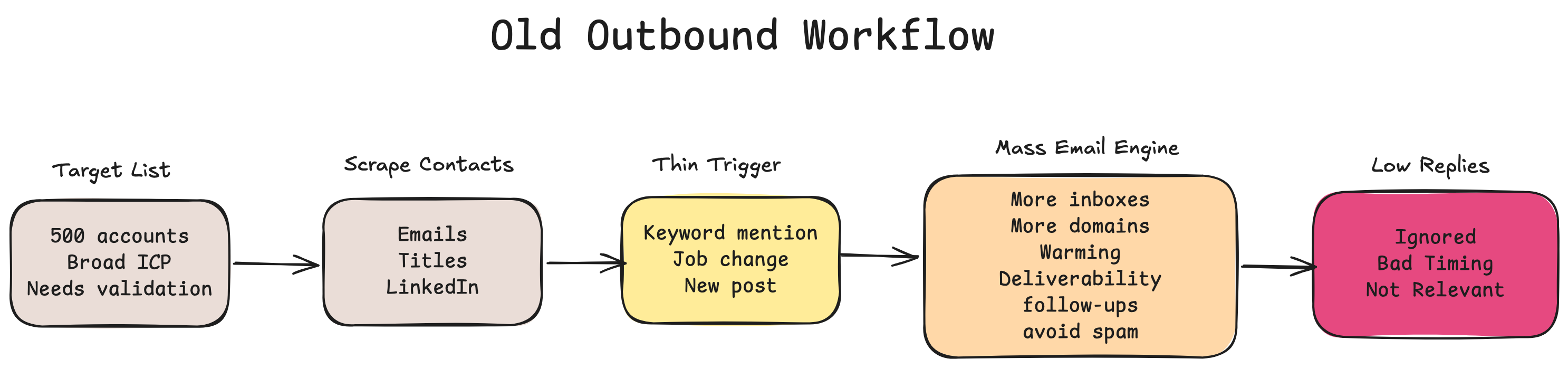
Most outbound agencies now claim to do personalization and “signal-based” prospecting.
But are they really doing justice to that idea? Or has “signals” become just another buzzword?
Take a simple example.
Someone at a target company writes a LinkedIn post mentioning a keyword. The outbound system immediately turns that into an email:
“I saw your post where you mentioned AI. We help companies with AI…”
Or someone changes jobs, and they receive:
“I noticed you were promoted to Senior Director. Congratulations. We help companies with…”
But is a keyword mention or a role change really a strong enough reason to land in their inbox?
Most of the time, no.
Mentioning a keyword does not mean the company has a problem you can solve.
A role change does not mean the person has budget.
It does not mean the problem is urgent.
It does not mean your solution is relevant.
And it does not mean now is the right time to reach out.
This is why so much outbound feels irrelevant, even when it is technically “personalized.”
A Better Way To Prospect
The better approach is simple:
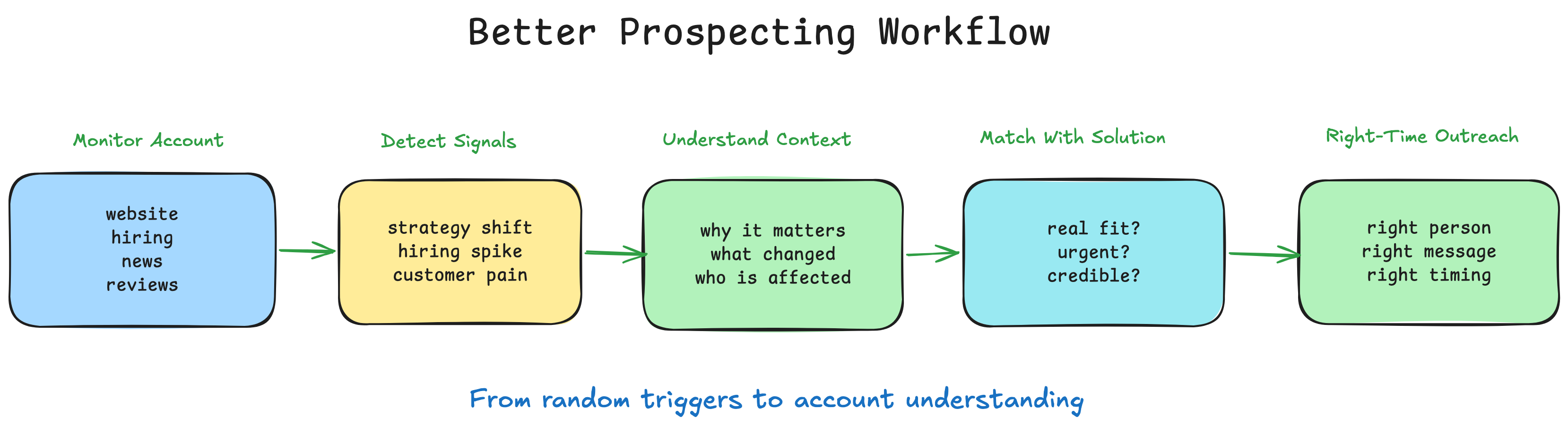
Go deeper into every target account before reaching out.
Before you send an email, you need to understand:
- How is the company positioning itself?
- What are they announcing to the market?
- What roles are they hiring for, and what do those roles signal about their priorities?
- What are their customers complaining about?
- What strategic moves are they making?
Once you understand those things, you can ask two more important questions:
- Does this company have a problem that we can solve?
- Is the timing strong enough to justify outreach?
If the answer is yes, your outreach becomes much stronger.
You are no longer trying to attach your company to a random keyword. You are connecting your solution to a real company priority, at a moment when that priority may actually matter.
You are no longer saying:
“I saw you mentioned this keyword.”
You are saying:
“Your company seems to be moving in this direction. Based on your recent hiring, announcements, and customer feedback, this looks like an area your team may be prioritizing. Here is where we may be able to help.”
That is a very different kind of prospecting.
It is based on timing, context, and relevance.
At this point, you might be thinking:
“This sounds useful, but it also sounds like a lot of work.”
And that would be true if you had to do it manually.
But you do not.
With the right tech stack, you can automate most of this workflow in less than a day. The system can monitor accounts, identify useful signals, compare them against your company context, and help you decide when an account is worth reaching out to.
The Three Things A Better System Needs
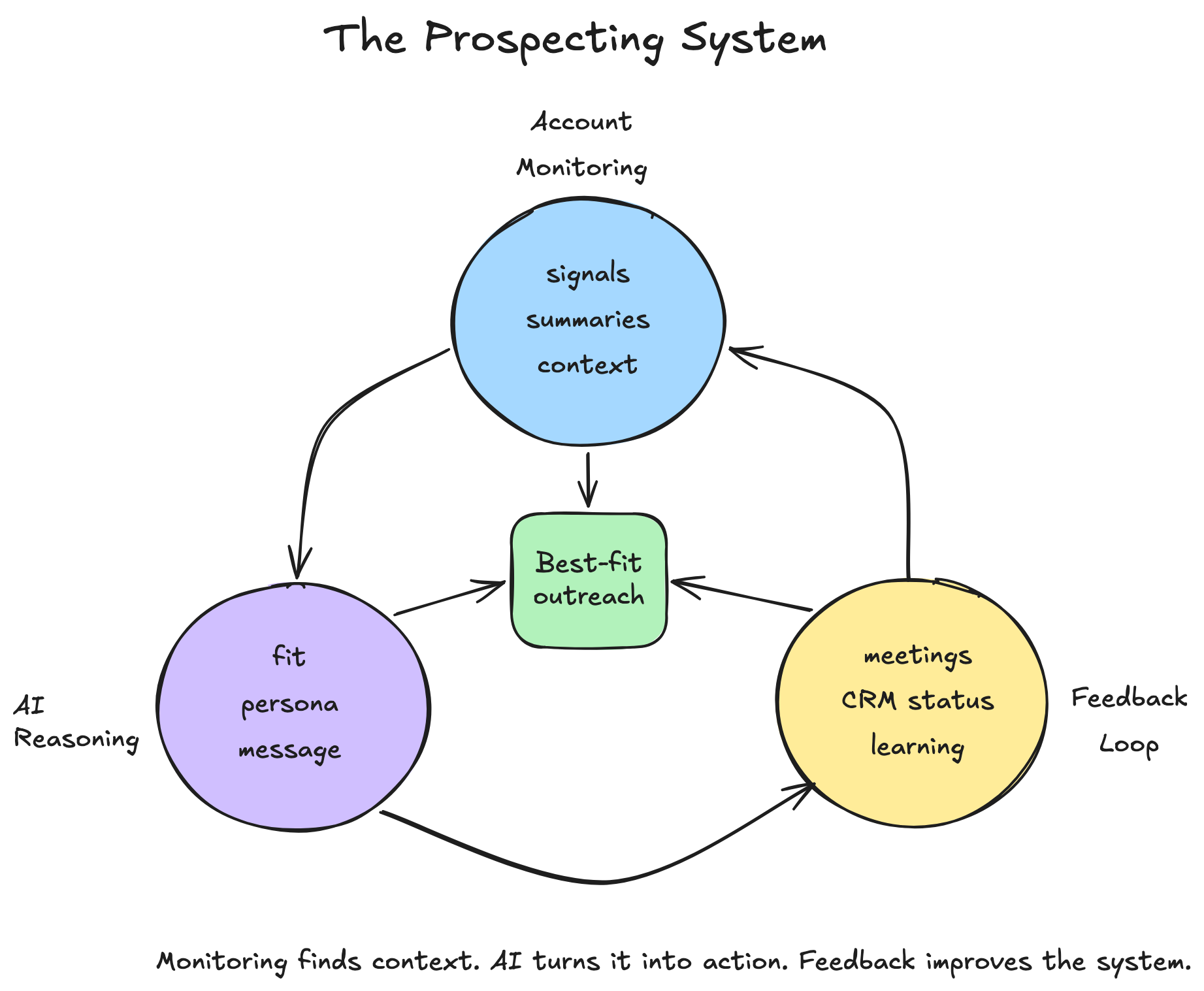
A better prospecting system needs three things.
First, it needs to continuously monitor your target accounts.
And not just for high-level, flimsy changes.
It needs to capture useful signals with the full context around them, then evaluate that context against the solution you offer.
This includes signals from their website, social media, hiring activity, announcements, news, customer reviews, and other public sources.
Second, it needs AI reasoning on top of those signals and summaries.
The system should help answer:
- Does this company have a problem we can solve?
- Is this account worth reaching out to now?
- What should sales do next?
And then it should help take action:
- Draft the email
- Generate a talk track
- Create a sales play
- Route the account to the right person
Third, it needs feedback and measurement.
If an account turns into a meeting, the system should know that.
If an account is no longer relevant, it should be removed.
If new accounts should be added, the system should keep the pipeline fresh.
This is how prospecting becomes an automated, self-sustaining system instead of a one-time campaign.
The Stack: ConnectCurator, Claude, Slack, Gmail, And CRM
You can build this workflow using ConnectCurator.ai, Claude, Slack, Gmail, and your CRM.
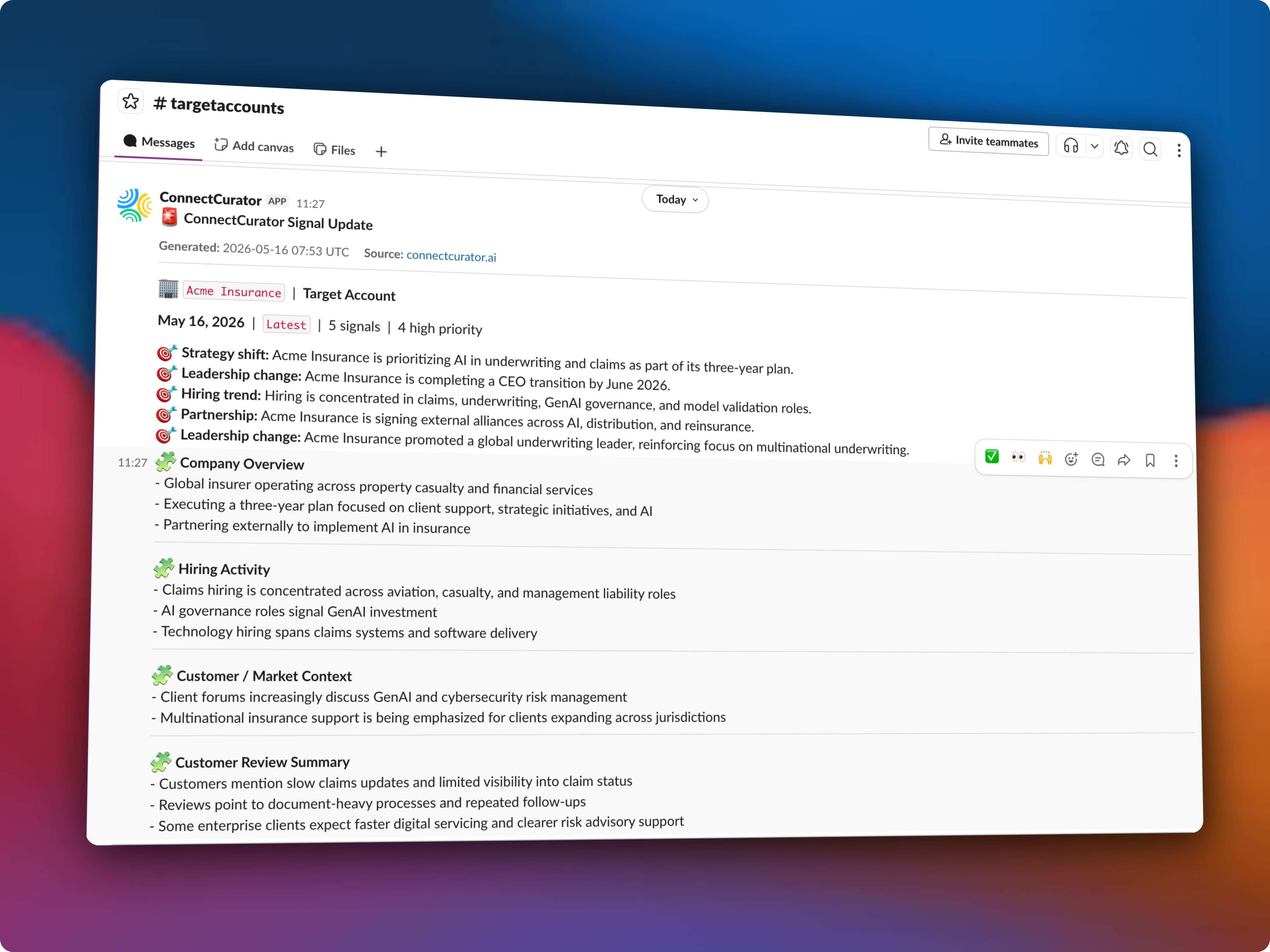
ConnectCurator.ai monitors your target accounts and sends structured updates into Slack.
For each account, ConnectCurator can track signals along with detailed context such as:
- Recent company moves
- Positioning changes
- Hiring activity
- Press releases
- News
- Website performance
- Social media updates
- Customer reviews
- Reddit mentions
This gives you a live stream of account intelligence.
Where Claude Fits In
Claude does not need to start from a blank page.
ConnectCurator has already monitored the account, filtered the noise, and surfaced both the relevant signals and the account context needed to understand why they matter.
That context is important because Claude is only as useful as the information it has in front of it.
A one-line signal like “Company is hiring SDRs” is not enough to make a good decision. It may be useful, but it is incomplete.
But if Claude can also see that the company is hiring ML engineers in Germany, launching a new product suite, increasing activity in a specific market, and receiving customer feedback around a related problem, it has a much better picture.
That broader context helps Claude reason more accurately. It can separate weak triggers from meaningful account movement, connect multiple signals together, and recommend a next step with more confidence.
Claude’s job is different.
It helps turn those signals and account context into the next best action.
For example, Claude can help answer:
- Which buyer persona should we reach out to?
- What should the email say?
- Should this go to sales, marketing, partnerships, or customer success?
- Should this be an outbound email, a follow-up, a CRM note, or a sales task?
- Does the signal point to a problem we can credibly help with?
- What talk track should the sales team use?
Claude can also look at your Gmail or CRM context, depending on what you connect, and help answer:
- Have we spoken to this account before?
- Is there already an open deal?
- Who owns the account?
- Has someone from this company replied in the past?
- Should this go to a new prospect, an existing contact, or the account owner?
Then Claude can draft the email, generate a talk track, or prepare a CRM note.
In some setups, Claude can also create or update CRM records, tasks, and notes. For Gmail, Claude can create a draft, but the final send should usually remain human-approved.
A Working Example
Let’s say ConnectCurator sends a Slack update about Acme Insurance, a global insurance company.
ConnectCurator shows that Acme Insurance is:
- Prioritizing AI in underwriting and claims as part of a three-year strategic plan
- Discussing GenAI and cybersecurity risk management in client forums
- Hiring for claims, underwriting, GenAI governance, model validation, and claims systems roles
- Going through a CEO transition, with a new CEO taking over in June 2026
- Building external partnerships across AI, insurance distribution, and reinsurance
- Emphasizing multinational insurance support for clients expanding across jurisdictions
Claude then checks the connected CRM and finds that Acme Insurance is already in the target account list, but there is no open opportunity.
It also finds that your team had one email exchange with someone in the claims operations team six months ago, but there has been no recent follow-up.
Based on the ConnectCurator signal and the CRM history, Claude recommends:
- Priority: High
- Owner: Sales
- Persona: Claims Operations or AI Governance
- Action: Create a sales task for the account owner
- Talk track: AI adoption in claims, model governance, and operational reliability
- Email type: Follow-up to the existing claims operations contact, not a cold email to a new person
Claude then drafts a short email for review:
Hi [Name],
I noticed Acme Insurance has been increasing focus on AI in underwriting and claims, including new hiring around GenAI governance and model validation.
Given your team’s role in claims operations, I thought it may be useful to reconnect. Teams moving AI into claims workflows often run into questions around governance, reliability, and operational handoffs.
Would it be worth a short conversation to compare notes?
The account owner reviews the draft, edits if needed, and sends it from Gmail.
That is the workflow.
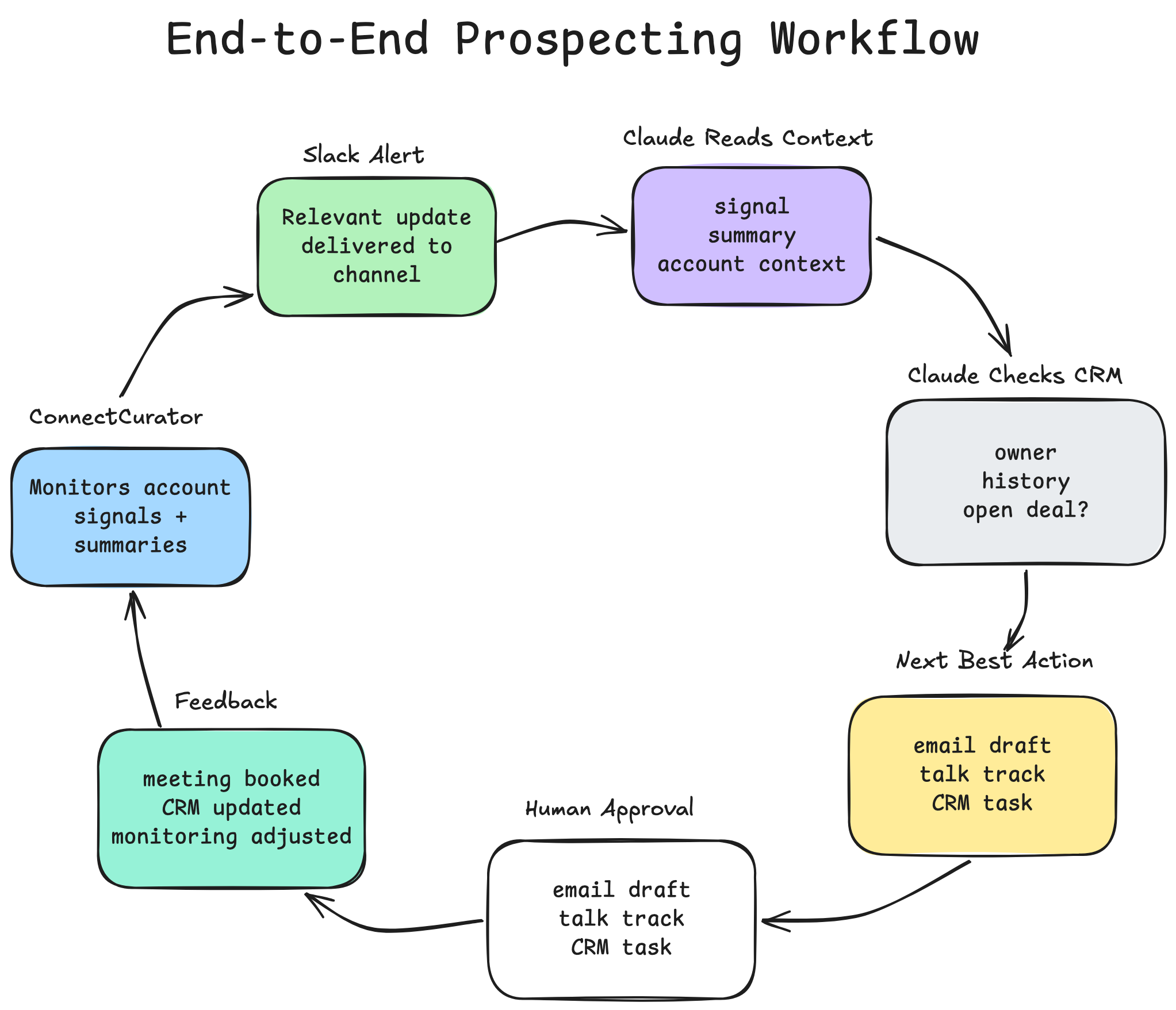
ConnectCurator surfaces the relevant account signal and context. Claude checks the relationship history, decides the next best action, prepares the talk track, and drafts the email for human approval.
The Feedback Loop
The system should not stop after the email is drafted.
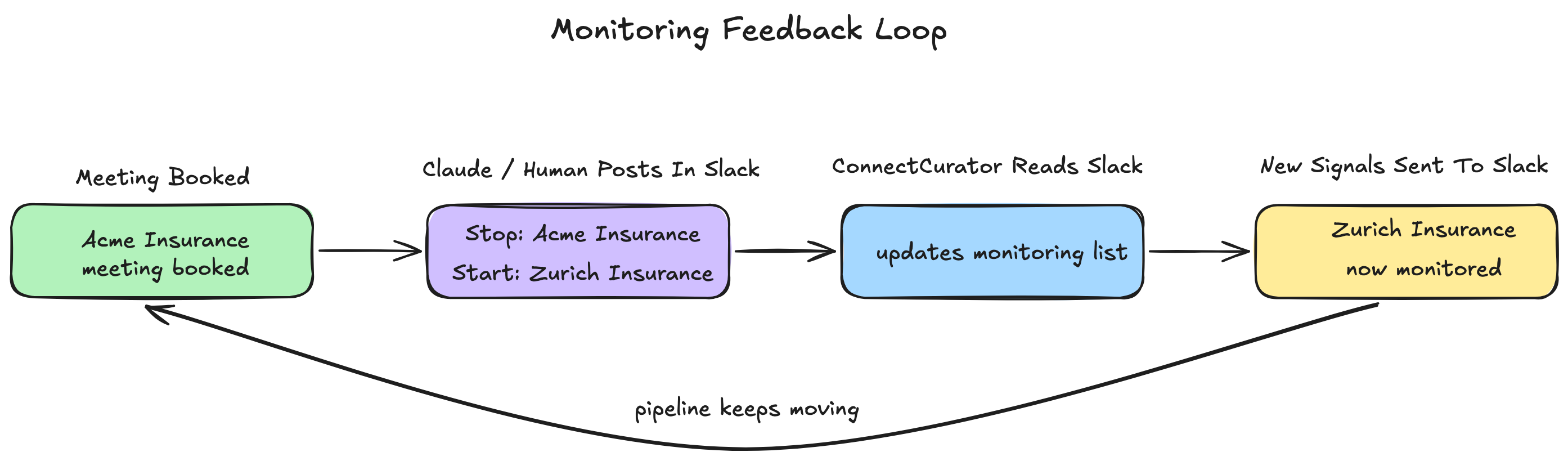
Once an account turns into a meeting, the monitoring list should update.
For example, if Acme Insurance books a meeting, the account owner or Claude can post a simple message in Slack:
“Meeting booked with Acme Insurance. Stop active monitoring for Acme Insurance and add Zurich Insurance to the target account list.”
ConnectCurator can read that message and update the monitoring list.
That means the system can:
- Stop or reduce monitoring for accounts that are already in motion
- Add new accounts to keep the pipeline full
- Keep the target account list fresh
- Track which signals led to meetings
- Keep sales focused on accounts that still need action
This is how the workflow becomes self-sustaining.
The system is not just finding signals and drafting emails. It is also learning which accounts should stay in motion and which new accounts should enter the pipeline.
Why This Beats Traditional Outbound
This workflow changes the goal of prospecting.
The goal is no longer to send as many emails as possible.
The goal is to reach the right account, at the right time, with the right context.
That means:
- Fewer bad-fit emails
- Better personalization
- Better timing
- Better account selection
- Less dependence on expensive outbound agencies
- More control over your own prospecting process
And the setup does not need to be complicated.
You can start with:
- ConnectCurator for account monitoring, signals, and summaries
- Slack for receiving the updates
- Claude for reasoning, routing, talk tracks, and email drafts
- Gmail for reviewed email sending
- HubSpot or Salesforce for account ownership, CRM history, and feedback tracking
If you already use an enrichment tool like Clay, you can add it for contact discovery, missing emails, job titles, and workflow automation.
But it does not need to be the center of the system.
The core workflow is simple:
ConnectCurator finds the relevant account context. Claude turns it into action. Your CRM tracks what happens next.
This can be set up quickly and start creating value almost immediately.
Final Thought
Outbound is not dead.
But shallow outbound is becoming less useful every day.
The future of prospecting is not more emails. It is better account understanding.
ConnectCurator gives you the relevant account signals, summaries, and context. Claude helps turn that context into the next best action.
Together, they help you build a prospecting system based on timing, relevance, and real account intelligence.
If you want help setting this up, reach out at niraj@connectcurator.ai